
To manage your saved payment cards, follow these steps:
Accessing Your Payment Methods
-
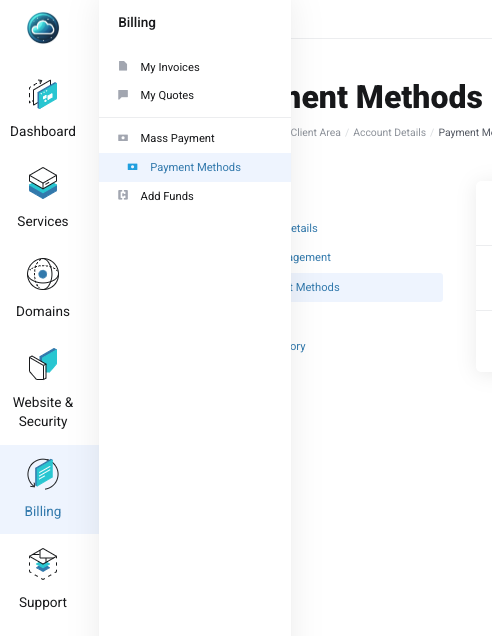
Navigate to the Billing menu on the left side of the Nubius Customer Portal.
-
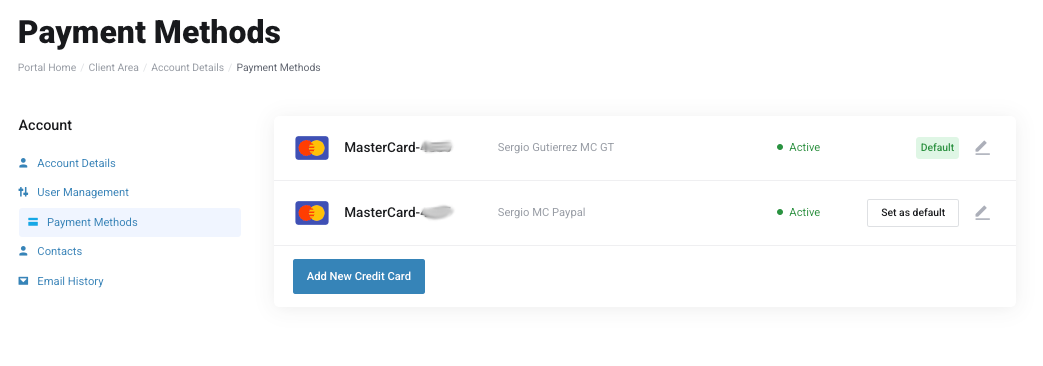
Click on Payment Methods to view all saved credit/debit cards.
Adding a New Card
-
Click on Add New Payment Method.
-
Enter your card details securely.
-
Select Save Payment Method to complete the process.
Note: We use Stripe as our primary payment processor and also support PayPal for card payments.
Setting a Default Card
If you have multiple saved cards, you can choose which one to use as your default payment method:
-
Navigate to Payment Methods.
-
Select the card you want to set as default.
-
Click Set as Default.
Removing a Saved Card
If you need to remove an outdated or unused card, please reach out to billing@support.nubius.io
Security & Compliance
-
Nubius Solutions does not store credit card details in its system.
-
All card data is securely processed by Stripe or PayPal.
-
Our platform is PCI compliant, ensuring adherence to industry security standards.
For any issues managing your payment methods, contact Billing Support through the portal or email billing@support.nubius.io.