
Domain Renewal Process
To avoid losing your domain, it is important to renew it before it expires. Nubius Solutions offers both manual renewaland auto-renewal options for managing domain expirations.
How to Manually Renew a Domain
-
Log in to the Nubius Customer Portal.
-
Navigate to Domains → My Domains.
-
Locate the domain you want to renew.
-
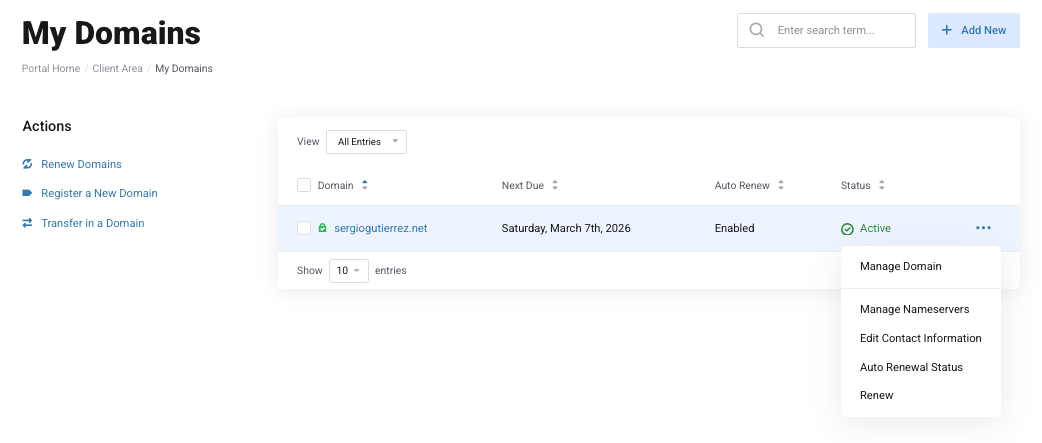
Click the three dots on the right side of the domain.
-
Select Renew.
-
Complete the checkout process to finalize the renewal.
How to Enable Auto-Renewal
Auto-renewal ensures your domain is automatically renewed before expiration. When enabled, an invoice is generated prior to the expiration date. You must ensure the invoice is paid for the renewal to be processed.
To enable auto-renewal:
-
Log in to the Nubius Customer Portal.
-
Go to Domains → My Domains.
-
Select the domain you want to configure.
-
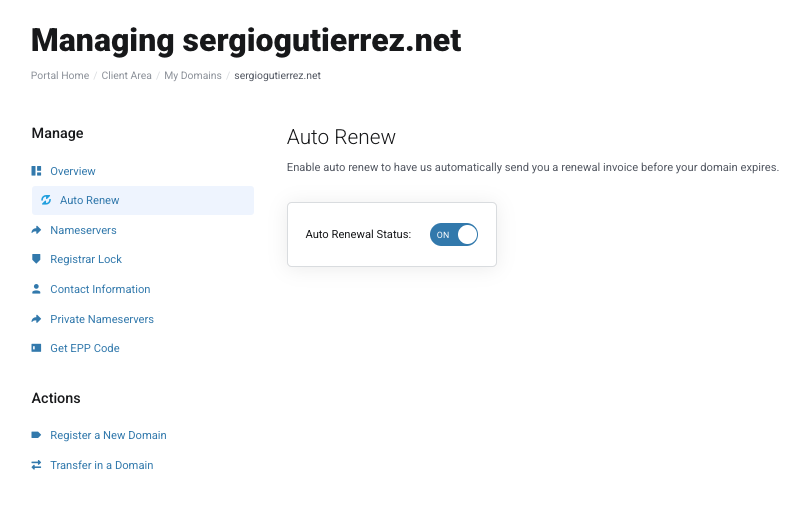
Locate the Auto-Renewal option and toggle it on.
-
Ensure that your payment details are updated to avoid failed payments.
Renewal Notifications
Nubius Solutions sends multiple domain renewal reminders before and after the expiration date:
-
First Notice: 30 days before expiration.
-
Second Notice: 14 days before expiration.
-
Third Notice: 7 days before expiration.
-
Final Notice: 1 day after expiration.
If your domain expires, you may still have a chance to recover it during the grace period.
Understanding Grace & Redemption Periods
When a domain expires, it does not become available for registration immediately. The following periods apply:
1. Grace Period (Varies by TLD)
-
Most domains have a grace period of 0–30 days after expiration.
-
During this period, you can renew the domain at the regular renewal fee.
-
The domain remains inactive until renewed.
2. Redemption Period (Varies by TLD)
-
If a domain is not renewed during the grace period, it enters the redemption period (typically 30–60 days).
-
Recovering a domain during this period involves a higher redemption fee set by the registry.
-
If the domain is not renewed by the end of this period, it may become available for public registration.
3. Domain Deletion & Reavailability
-
After the redemption period, the domain is permanently deleted and becomes available for new registration.
-
There is no guarantee that you will be able to re-register the domain, as it may be acquired by someone else.
Best Practices for Domain Renewals
-
Enable Auto-Renewal to avoid accidental expiration.
-
Keep your contact email updated to receive renewal reminders.
-
Renew before the grace period ends to avoid additional fees.
-
If your domain enters the redemption period, contact Billing immediately for recovery options.
For any assistance with domain renewals, reach out to Billing via the Nubius Customer Portal or by sending an email to billing@support.nubius.io