
The Speed Tab in Nubius CloudShield allows you to optimize your website’s performance by enabling various caching and optimization features.
To access these settings:
-
Log in to the Nubius Customer Portal.
-
Navigate to Services → My Services.
-
Select your Nubius CloudShield service.
-
Click Manage Cloudflare for the domain you want to configure.
-
Go to the Speed Tab.
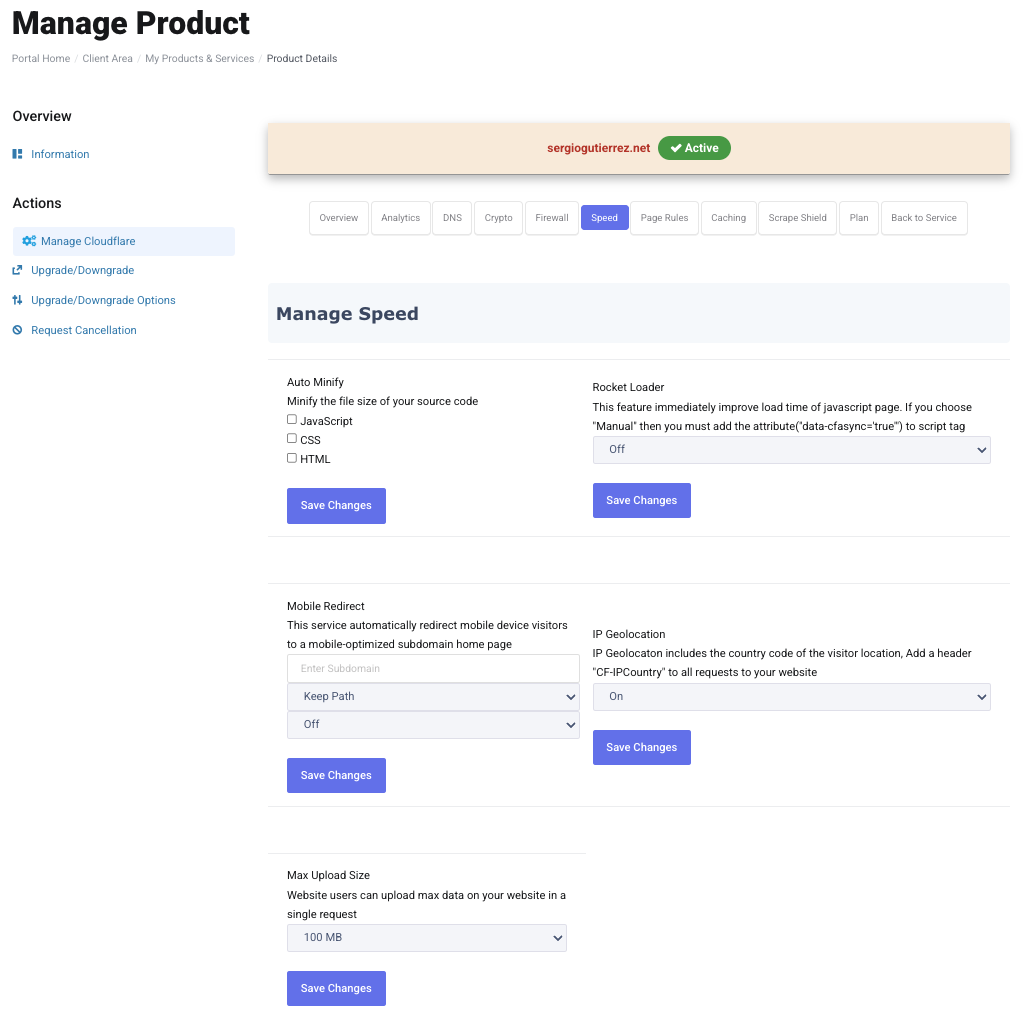
Available Performance Settings
1. Auto Minify
-
Automatically reduces the size of JavaScript, CSS, and HTML files.
-
Options:
-
JavaScript – Removes unnecessary characters from JS files without affecting functionality.
-
CSS – Compresses CSS files to load styles faster.
-
HTML – Minifies HTML to reduce page size.
-
-
Recommended: Enable all options to improve load speeds.
2. Rocket Loader
-
Improves page load time by asynchronously loading JavaScript files.
-
Helps speed up websites with many third-party scripts.
-
Options:
-
Automatic (Recommended) – Optimizes JavaScript delivery without breaking functionality.
-
Manual – Allows manual control over which scripts to optimize.
-
Off – Disables Rocket Loader (use if it causes conflicts with your site).
-
3. Mobile Redirect
-
Automatically redirects visitors on mobile devices to a mobile-friendly version of your website.
-
How to configure:
-
Enable Mobile Redirect.
-
Enter the mobile subdomain (e.g., m.yourdomain.com).
-
Choose which devices should be redirected (Smartphones, Tablets, or both).
-
4. IP Geolocation
-
Identifies visitors’ geographic locations based on their IP addresses.
-
Uses:
-
Displaying country-specific content.
-
Blocking traffic from specific regions (use with Firewall settings).
-
Enabling geo-targeted marketing and analytics.
-
5. Max Upload Size
-
Defines the maximum file size visitors can upload to your website.
-
Limits:
-
Free & Pro Plans: 100MB
-
Business Plan: 200MB
-
Enterprise Plan: 500MB
-
Note: If you need higher limits, consider upgrading to a Business or Enterprise plan.
Best Practices for Speed Optimization
-
Enable Auto Minify for smaller file sizes.
-
Use Rocket Loader to optimize JavaScript loading.
-
Redirect mobile users to a mobile-optimized site.
-
Enable IP Geolocation for better content targeting.
-
If large file uploads are needed, consider upgrading your CloudShield plan.
For more details, refer to Cloudflare’s Speed Optimization Documentation.
If you need assistance, contact Support via the Nubius Customer Portal.